At Rockfeller, every new system shipped with its own login screen. On the day a system is born, that looks like the fastest route. Over the following months it turns into maintenance, support and risk, multiplied by the number of systems.
Conta Rockfeller is my answer to that: a single sign-in, in the style of Google Accounts, that now authenticates eight internal systems. I'll walk through the decisions I made along the way, including one I had to undo. In SSO, writing the login flow is the easy part. What took my time was deciding where each responsibility lives.
How things were before
Looking at one system at a time, everything was fine. Looking at all of them together, each one repeated the same authentication stack, written from scratch and with its own bugs: a users table, password hashing, "forgot my password", a reset email, invites with an initial password and some script to create the first admin.
Someone who works at a franchise school uses several of these systems in the same day. That meant several passwords and several places to change their name or photo. When someone left a school, their access had to be removed system by system, and forgetting a single one was enough for that person to keep getting in.
The most important business rule, something like "the coordinator of school X sees the students of school X", also existed in several versions, each with different names and edge cases. On top of that, several systems on the same parent domain used cookies named session, and sometimes one would read its neighbor's cookie.
Data went stale too. If someone's name changed or an account was deactivated, the system only found out on that person's next login, if at all. And as MCP servers arrived, every product started issuing personal API keys to connect AI agents. Those keys leak, have no second factor, don't expire and ignore per-school permissions.
None of this is exotic. It's the cost of not having a central identity, and it grows with each new system.
What I wanted
Before writing code, I wrote down what "done" meant. One account, with an account picker like Google's. Each system would still own its own session: the SSO says who the person is and the system decides what to do with that. Per-school authorization would have a single source of truth, and deactivating someone in one place would apply everywhere. Integrating the wrong way should take more work than integrating the right way. And no homegrown protocols.
That last requirement already picks the protocol: OpenID Connect, on top of OAuth 2.0.
Decision 1: OIDC instead of a shared cookie
The obvious shortcut would be a session cookie on the parent domain, read by every system. It works for the first week. After that, any system can read (and leak) every other system's session, logout becomes a synchronization problem and an XSS on a forgotten subdomain compromises the whole company.
Conta Rockfeller is an OpenID Provider. The central session lives in a host-only cookie that only the SSO itself can see. Each system is an OIDC client with its own cookie, and the link between them happens through the protocol.
The flow is Authorization Code with PKCE:
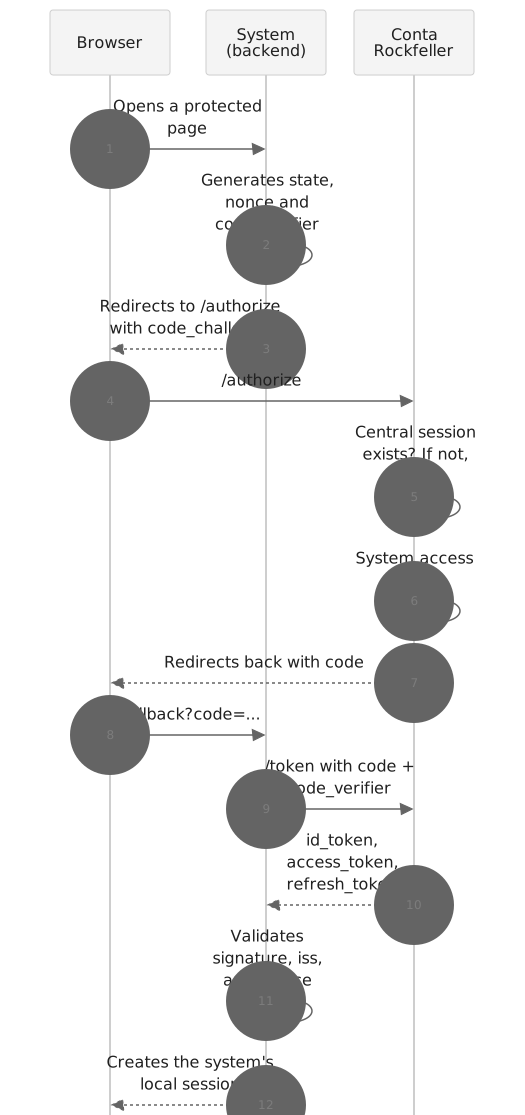
Three rules apply to every client. PKCE is mandatory even for confidential clients, which already have a secret: it protects the code against interception and costs nothing. The redirect URI has to match exactly, with no wildcard or prefix. And there's no dynamic client registration. An admin registers each system, with separate clients for staging and production, and each one gets its own aud, so a staging token never passes in production.
Why Better Auth
I didn't want to write an OAuth server from scratch, or run Keycloak with a small team. Better Auth, with its OAuth provider plugin, gave me the protocol core (authorize, token, JWKS, discovery, consent and end-session) inside a TypeScript application I control. Multiple sessions, second factor, email codes and passkeys come as plugins.
What Better Auth doesn't decide for me is exactly what makes this SSO Rockfeller's SSO: the access policy, the role model, the webhooks and secret rotation. That's where the time went.
Decision 2: a single origin
OIDC requires a single, stable issuer, and the central session has to live on a single host. The project, however, has two pieces: a Next.js portal (login, consent, "My account" and the admin panel) and a NestJS API, where Better Auth runs.
The way out was to serve both from the same origin:


The portal forwards the authentication routes to the API, and the API doesn't accept traffic that arrives any other way. The detail that took the most work was getting the proxy to forward the host headers correctly. When it gets them wrong, discovery advertises an issuer different from the one the client expects, and nothing works.
Decision 3: identity and authorization stay separate
The decision that weighed most on the project was defining what the token doesn't carry.
People with memberships
There is no userType. Everyone is a User. Student, teacher, front office, finance, school manager and franchisee are roles within memberships in an organization, which can be the franchisor or a school.
The same person can be a teacher at one school and a coordinator at another. Each membership also records where it came from: the school management system, an invite or an assignment by the franchisor. That matters for revocation. Revoking an invite can't delete a membership that came from the sync, and vice versa.
I evaluated Better Auth's organizations plugin and gave up on it. It stores one role per member, has no organization type or hierarchy, and ships endpoints to create an organization, invite people and switch the active organization, which I'd have had to turn off one by one. Here nobody creates a school by hand: schools come from the school management system, which is the source of truth for school units, via webhook and a nightly reconciliation.
Lean token, authorization in the system
The access token is a JWT that carries only sub, aud and scope. The active school and the list of permissions are left out.
Conta Rockfeller stores the memberships and the catalog (role → permissions, per system). The system, which knows the resource, decides whether the person can touch that student or that class. Permissions are namespaced per system, and each system only sees its own.
An operation only goes through if every one of the conditions below is true:
// Deny by default: each line is a necessary condition.
const allowed =
	account.active &&
	app.accessGranted &&
	membership.validFor(schoolId) &&
	permissions.includes('students.read') &&
	(await resourceBelongsTo(studentId, schoolId)) &&
	authIsRecentEnough(permission, session.authTime);
The school is always explicit in the operation. An "active school" stored in the session is implicit state, and implicit state is the classic way data leaks from one school to another.
The system's backend looks up permissions using the client's own credential (client_credentials) and keeps the response in a short-lived cache. Some permissions are sensitive, like refunding a payment or assigning roles, and require a recent login. The system checks that requirement against the ID token's auth_time and, if the login is old, sends the person back to the SSO with max_age before going ahead.
The role and permission catalog lives in the database and can be edited from the admin panel. Each instance keeps a copy in memory and throws it away when the version in the shared cache changes, so an edit reaches all of them within seconds.
Tokens and sessions
| What | Lifetime | Why |
|---|---|---|
| Access token | Short | Validated locally via JWKS; since it can't be revoked, it has to expire soon |
| ID token | Short | Only used to build the local session |
| Refresh token | Long, rotating | Any reuse is treated as replay and kills the family (RFC 9700) |
| Central session | Long, renewed on use | People who use it every day don't have to sign in again |
Signing keys change from time to time. The new key shows up in the JWKS before it starts signing, and the old one stays published for a grace period, so no system with a cached JWKS rejects a valid token.
The gate is at token issuance
The OAuth provider has no "deny authorization" hook that can see the client. That's why each system's access policy runs at two points.
The first is the issuance of any token, whether through authorization_code or refresh_token. That's the real gate, and it's why a deactivated account or a revoked membership stops refreshing tokens right away. The second is a hook before /authorize, which only improves the experience: it shows an "access denied" screen instead of sending the person back to the system with a raw error.
Each system is either open (any active, verified account gets in) or restricted (requires a role that grants access to it), and can also accept corporate emails only. The SSO never issues a token for an unverified email, which lets systems link accounts by email safely.
Profile in the ID token
By default, the provider only returns name and email from /userinfo. I put those claims in the ID token itself, according to the granted scopes. The system builds its local session without an extra network round trip, and the profile arrives signed and bound to the nonce.
Global logout
Signing out of a system calls end-session, which ends the central session. The SSO then sends a back-channel logout (a signed JWT, server to server) to every system where the person had a session, and each one tears down its own.
When an admin deactivates an account, the path is the same with one extra step: offline-access refresh tokens are revoked too, which a standard logout would leave alone.
The back-channel call is a single attempt. When a session ends for some other reason (it expired, or was ended from "My account"), the system receives a session.ended event through the webhook infrastructure, which is what the next section covers.
Webhooks with an outbox
Logout takes care of sessions, but the stale data is still there. For that, Conta Rockfeller notifies systems through webhooks: user.updated, user.disabled, user.deleted, membership.granted, membership.revoked, app.access_revoked and session.ended.
The hard part is guaranteeing two things at once: never announce something that didn't happen, and never fail to announce something that did. Writing to the database and publishing to the queue are two operations, and if the API goes down between them the notification lies. The classic answer is the transactional outbox:


The event and one delivery per recipient are written in the same transaction as the change, and nothing goes to the queue before the commit. A worker claims pending deliveries with FOR UPDATE SKIP LOCKED and enqueues them with a deterministic jobId, so a crash halfway through doesn't duplicate anything.
Delivery is at-least-once, in the Standard Webhooks format, signed with HMAC. The webhook-id is the event id and stays the same across every attempt, so the system deduplicates on it. Ordering isn't guaranteed, so the user's updatedAt works as a version. Retries use backoff with jitter. An endpoint that keeps failing for too long gets disabled, and the admins receive an email.
The detail I like most is user.updated. It's computed as the difference from the last snapshot sent to that system and filtered by the scopes that system was granted. A system without the email scope never hears about an email change, and if nothing visible changed, the event doesn't go out.
Since the SSO makes requests to URLs registered by other teams, it's a natural candidate for SSRF. Webhook delivery was written with that in mind, and the signing secrets are encrypted in the database.
Security
Much of what's there is what you'd expect: global and per-route rate limiting, captcha on the authentication screens, CSP with a per-request nonce, HSTS, frame-ancestors 'none' and a check on the Origin header for cookie-authenticated mutations. A few choices deserve an explanation.
Passwords that have already shown up in breaches are rejected. The check uses Pwned Passwords via k-anonymity, so the password itself never leaves the server. Disposable emails are kept out of sign-up as well.
A passkey with user verification already counts as two factors, since it combines possession of the device with biometrics or a PIN. For those who prefer it, there's TOTP. A second factor is mandatory for admins, and the admin panel only opens once it has been verified in the current session.
Changing your email, managing passkeys or exporting your data requires a recent login. Signing in from a new device sends a warning email. It's cheap to build and one of the most useful alerts for someone who fell for a phishing attempt.
The audit log is insert-only. The application's database user has no permission to change or delete those records, so neither a bug nor someone who takes over the application can cover their tracks.
Rotating secrets without logging anyone out took more work than I expected. At first, changing Better Auth's main secret logged everyone out and made everything encrypted with it unreadable. Now secrets are versioned: the newest one signs and encrypts, the older ones only open what already existed, and anything still on an old version gets migrated gradually. Rotating a secret became routine maintenance.
LGPD was part of the design from day one. Deleting an account anonymizes the data after a grace period, and a sub is never reused. People can export their own data, and expired sessions, codes, tokens and audit records are deleted by a retention job.
The SDK I said I wouldn't build
One of the first decisions I recorded was "there will be no custom SDK". Each system would use a generic OIDC library and follow an integration guide. It seemed like the most honest option: an open standard, no lock-in and no package to maintain.
It didn't last. In practice, every system copied a configuration with a dozen options from the docs, plus the back-channel route, the system's own token and the permissions cache. Copying is where the mistakes creep in: a scope without offline_access, a forgotten profile override, a back-channel handler that didn't check the nonce. One of the systems even integrated with the generic OAuth provider first and redid everything with the plugin shortly after. That's when it became clear the guide wasn't enough.
I reversed the decision and wrote a plugin for Better Auth. The integration now looks like this:
import { betterAuth } from 'better-auth';
import { sso } from './lib/sso';

export const auth = betterAuth({
	plugins: [
		sso({
			clientId: process.env.SSO_CLIENT_ID,
			clientSecret: process.env.SSO_CLIENT_SECRET,
		}),
	],
});
The plugin pulls together the decisions each system used to make on its own. The SSO endpoints are derived from the issuer, with no discovery at startup, so the system boots even when the SSO is down. The profile comes from the ID token, without a trip to /userinfo. Local login is blocked by default, with an explicit way out for anyone who needs to keep another audience on its own login.
It also refreshes each account's token one at a time. With rotating refresh tokens and reuse detection, two tabs refreshing together would kill the token family. Permissions sit in a short-lived cache that is invalidated all at once when a back-channel logout arrives. And signOut() returns the end-session URL without redirecting, so the system can choose between signing out of itself only or ending the SSO session.
For APIs there are two separate entry points: a token verifier that doesn't depend on Better Auth, and a NestJS module that protects every route by default.
@Controller('schools/:schoolId/students')
export class StudentsController {
	@Get()
	@RequirePermission('students.read')
	list(@Param('schoolId') schoolId: string) {
		// Only reached with a valid token, a membership in the school and the permission.
		return this.students.listBySchool(schoolId);
	}
}
"No SDK" is still a good position in principle. As an operational position, with several teams integrating in a hurry, it didn't hold up. The standard is still open, and the guide for integrating without the plugin is still there. The plugin just takes off the teams' plates the decisions they shouldn't be making.
AI agents
The MCP authorization spec follows OAuth 2.1: the MCP server is a protected resource and login happens at an authorization server, a role Conta Rockfeller already played.
The problem is that agents like Claude, ChatGPT or Cursor aren't clients registered by an admin. For them, the SSO accepts Client ID Metadata Documents: the agent identifies itself with a URL that publishes its metadata, and the SSO creates the client the first time it sees it. Dynamic registration stays off, and only agents from approved domains are accepted.
Every agent client starts out with mandatory consent (the screen makes it clear that this is an AI agent and which domain identifies it) and identity scopes only. Management scopes are rejected. What the agent can do on each MCP server depends on the person's permissions at that school, which the MCP server looks up with its own credential.
Personal API keys are gone. In their place are short-lived tokens that the person can revoke from "My account" and that respect the second factor and global logout.
Adoption
Today, eight internal systems authenticate through Conta Rockfeller, and the migration followed the same playbook in all of them.
On first login, the local account is linked by verified email; from then on, by sub. Then comes the most satisfying part, which is deleting code: password reset and change, invite with password, first-admin creation, login DTOs and hand-rolled JWT. In more than one system the migration removed more lines than it added, and where passwords were stored they were wiped from the database. Each system also got its own cookie prefix, so it never again reads a neighbor's session, plus an endpoint that verifies webhook signatures and ignores repeated events.
The internal project generator already offers the integration as an option, and the design system has a "Sign in with Conta Rockfeller" button. A new system starts out integrated, so the right path is now also the shortest one.
What I'm taking away
Keeping the access token lean and leaving resource authorization to the system kept me out of the most common trap in corporate SSO: a fat token full of permissions that go stale a minute later. Enforcing the access policy on every token issuance, refresh included, protects more than any "access denied" screen.
Recording each decision in a short ADR, with context and consequences, helped more than I expected. When "no SDK" fell, the reasons it existed and the reasons it stopped making sense were already written down, and nobody had to guess.
Documentation alone doesn't scale across teams in a hurry. What scaled was a plugin with secure defaults, a button in the design system and an option in the project generator.
Finally, operations are part of the product too. Rotating secrets without logging anyone out, publishing keys before using them and deleting expired data never show up in a demo, but they're what makes it possible to run the SSO day to day.
If every new system at your company still ships with its own login screen, it's worth centralizing identity before the next one shows up.